
Blog
Frigidaire Refrigerator Not Cooling: Causes, Fixes, and Troubleshooting Guide


A Frigidaire refrigerator not cooling properly can quickly become a serious household problem, especially when food and beverages are no longer staying at a safe temperature. Fortunately, a refrigerator that is warm inside does not always mean that the appliance needs to be replaced. In many situations, the problem can be traced to airflow, temperature settings, dirty condenser components, blocked vents, excessive frost, or a malfunctioning fan.
We can troubleshoot many common cooling problems by checking the refrigerator systematically. The key is to identify whether the appliance is running normally, running continuously, making unusual noises, or showing signs of frost or restricted airflow. The following guide covers the most common reasons a Frigidaire refrigerator is not cooling and explains practical steps for diagnosing the issue.
Check the Refrigerator Temperature and Power Supply
The first step is to confirm that the refrigerator is actually receiving power and operating correctly. If the interior lights are off, the display is blank, or the compressor is completely silent, the issue may be electrical rather than related to cooling.
We should check that the power cord is firmly connected to the wall outlet. If the refrigerator is connected through an extension cord or power strip, connecting it directly to a suitable wall outlet can help eliminate a possible power-delivery problem. We should also check the household circuit breaker.
Next, inspect the temperature settings. A refrigerator compartment should generally be maintained around 37°F (3°C), although the recommended setting can vary by model. If the temperature control has accidentally been adjusted warmer, the refrigerator may appear to have stopped cooling.
We should avoid repeatedly changing the temperature setting. After making an adjustment, the refrigerator needs sufficient time to stabilize. Placing a refrigerator thermometer inside the compartment can provide a more reliable reading than judging the temperature by touch.
Inspect Air Vents and Food Placement
One of the simplest causes of a Frigidaire refrigerator not cooling is restricted airflow. Refrigerators depend on the movement of cold air between different compartments. Food containers, packages, and shelves can accidentally block air vents.
We should locate the refrigerator’s air vents and make sure they are not covered by food. Large containers positioned directly against a vent can prevent cold air from circulating throughout the compartment.
An overloaded refrigerator can create a similar problem. When shelves are packed tightly, cold air cannot move efficiently, resulting in warm areas even though the cooling system itself is functioning.
At the same time, an almost-empty refrigerator may experience temperature fluctuations because there is less thermal mass inside. The goal is to maintain reasonable organization without blocking airflow.
We should also check whether the refrigerator and freezer doors close completely. A package, shelf, or drawer that prevents the door from sealing can allow warm air to enter continuously.
Clean the Condenser Coils and Check Ventilation
Dirty condenser coils are another common reason a refrigerator may struggle to cool. These components release heat removed from the refrigerator. When dust, pet hair, or debris accumulates around them, the appliance may have difficulty transferring heat efficiently.
Before cleaning, we should disconnect the refrigerator from electrical power. Depending on the model, the condenser components may be located underneath the appliance or behind it.
A suitable refrigerator coil brush or vacuum can be used carefully to remove accumulated dust. We should avoid damaging wires, tubing, or other components while cleaning.
The area around the refrigerator also matters. The appliance needs adequate clearance for heat to escape. If it is pushed tightly against a wall or surrounded by cabinets without sufficient ventilation, cooling performance may decline.
After cleaning the condenser area and restoring power, we should give the refrigerator time to return to its normal operating temperature.
Look for Excessive Frost or Ice Buildup
If the Frigidaire refrigerator is not cooling but the freezer is cold, excessive frost can be an important clue. Frost can accumulate around the evaporator area and restrict the movement of cold air.
A refrigerator with a frost-related problem may initially appear to work normally. Over time, however, airflow becomes increasingly restricted and the fresh-food compartment becomes warmer.
We should inspect the freezer compartment for unusually heavy frost or a thick layer of ice, particularly around the rear interior panel or air vents.
Modern refrigerators commonly use an automatic defrost system. This system includes components such as a defrost heater, thermostat or sensor, and electronic controls. If one of these components fails, frost can eventually interfere with normal airflow.
We should not chip away thick ice with a knife or another sharp object because doing so can damage the evaporator or refrigeration tubing. If excessive frost repeatedly returns after defrosting, professional diagnosis may be necessary.
Check the Evaporator and Condenser Fans
Refrigerators use fans to move air and transfer heat. A malfunctioning evaporator fan can prevent cold air from circulating properly inside the refrigerator.
We may hear a fan running when the refrigerator is operating. However, unusual noises such as grinding, squealing, rattling, or intermittent operation can indicate a fan-related problem.
The condenser fan is also important because it helps move air across the condenser area. If this fan stops operating, heat may not be removed effectively, and the refrigerator can become warmer than normal.
We should never place fingers or tools near a moving fan. For safety, power should be disconnected before inspecting components that require access to internal or rear sections of the appliance.
If a fan motor is defective, replacing it with the correct model-specific part may restore proper airflow. Because Frigidaire refrigerators differ in design, the exact component and testing procedure depend on the model.
Consider the Compressor, Start Components, and Refrigerant System
When basic troubleshooting does not solve the problem, the cooling system itself may require attention. The compressor is responsible for circulating refrigerant through the sealed refrigeration system. If the compressor is not operating correctly, the refrigerator may remain warm even when the lights and controls appear normal.
A refrigerator that runs almost continuously without reaching the correct temperature can also indicate a deeper problem. Possible causes include restricted airflow, inadequate heat transfer, a failing compressor, or an issue within the sealed system.
Refrigerant-related problems require particular caution. Refrigerant is contained within a sealed system, and diagnosing or repairing that system generally requires specialized equipment and appropriate technical knowledge.
We should not attempt to puncture refrigerant tubing or recharge the system using improvised equipment. A qualified appliance technician can test system pressures, inspect the compressor, and determine whether a sealed-system repair is appropriate.
The refrigerator’s model number is important when arranging service because it allows the technician to identify the correct components and technical specifications.
What to Do When a Frigidaire Refrigerator Still Is Not Cooling
If basic checks do not restore cooling, we should document the symptoms before arranging professional service. Useful observations include whether the freezer is cold, whether the refrigerator compartment is warm, whether the compressor runs continuously, whether fans are operating, whether frost is visible, and whether unusual noises occur.
We should also check whether the problem developed suddenly or gradually. A sudden loss of cooling can point toward an electrical, control, fan, or compressor-related issue, while gradually declining performance can be associated with airflow restrictions, dirty condenser components, deteriorating door seals, or other developing faults.
Food safety should remain a priority. Perishable food should not be kept indefinitely in a refrigerator that cannot maintain a safe temperature. When there is uncertainty about whether food has remained sufficiently cold, following established food-safety guidance is safer than relying on smell or appearance.
If the refrigerator is under warranty, we should review the warranty terms before paying for repairs or ordering parts. Unauthorized repairs can sometimes affect warranty coverage.
Frequently Asked Questions About a Frigidaire Refrigerator Not Cooling
Why is my Frigidaire refrigerator not cooling but the freezer is working?
A warm refrigerator with a functioning freezer can be associated with blocked airflow, an evaporator fan problem, excessive frost, or a defrost-system issue. Checking vents and frost buildup is a useful starting point.
Why is my Frigidaire refrigerator running but not getting cold?
Continuous operation without adequate cooling can result from dirty condenser components, poor ventilation, blocked airflow, door-seal problems, or a refrigeration-system fault. If basic cleaning and airflow checks do not help, professional diagnosis may be needed.
How long should we wait after changing the temperature?
A refrigerator does not cool instantly after a temperature adjustment. We should allow sufficient time for the appliance to stabilize rather than repeatedly changing the control.
Can dirty coils cause a refrigerator to stop cooling?
Yes. Heavy dust and debris on condenser components can reduce heat transfer and make cooling less efficient. Cleaning the condenser area can therefore be an important maintenance step.
When should we call a refrigerator technician?
Professional service is appropriate when the refrigerator remains warm after basic troubleshooting, repeatedly develops heavy frost, has a suspected compressor or fan failure, or appears to have a sealed-system or refrigerant problem.
Conclusion
When a Frigidaire refrigerator not cooling, the cause can range from a simple temperature-setting or airflow issue to a more complicated mechanical or refrigeration-system problem. Starting with the basics—power, temperature settings, door closure, food placement, vents, condenser cleanliness, and frost buildup—can identify many common problems without unnecessary repairs.
If those checks do not resolve the issue, examining fan operation and other components can help narrow down the cause. Problems involving the compressor, refrigerant circuit, electronic controls, or sealed refrigeration system are better handled by a qualified technician.
Regular condenser cleaning, proper food organization, unobstructed vents, good door seals, and appropriate temperature settings can also help maintain reliable refrigerator performance and reduce the likelihood of future cooling problems.
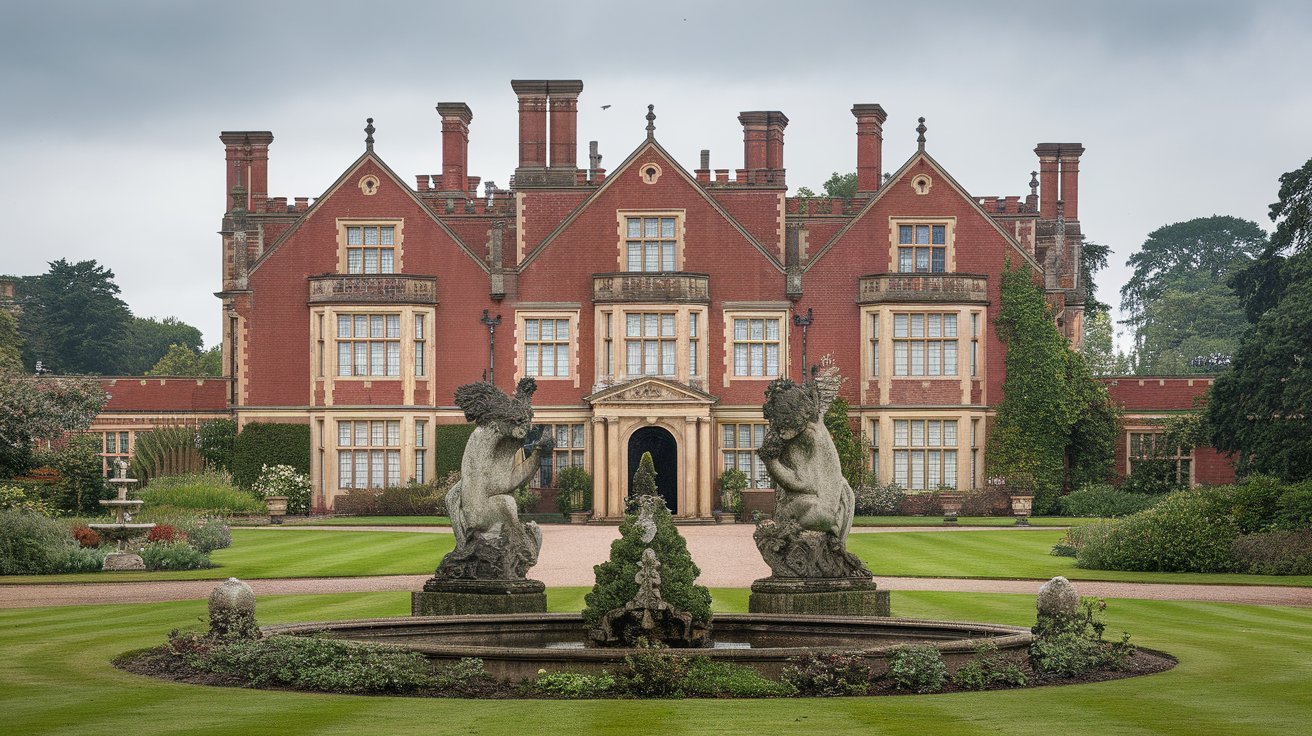
Burghley House is one of England’s most remarkable surviving 16th-century country houses, standing near Stamford in Lincolnshire. Created for William Cecil, one of the most powerful statesmen of Elizabeth I’s reign, the house combines spectacular Elizabethan architecture with extraordinary interiors, fine art, historic gardens and a large surrounding parkland.
More than 500 years after construction began, Burghley remains a living family home as well as a major heritage attraction. Visitors can explore its magnificent State Rooms, gardens, parkland, exhibitions, shops, restaurants and family attractions.
What Is Burghley House?
Burghley House is a grand Elizabethan house located close to Stamford, Lincolnshire. It was commissioned by William Cecil, 1st Baron Burghley, who served as Lord High Treasurer to Queen Elizabeth I.
The building was conceived not simply as a residence but also as a powerful demonstration of Cecil’s status, wealth and influence. Construction began in 1554, with the east and south ranges substantially completed by 1564. The west front, including its great gate-house, was completed in 1577, while the north front followed in 1587.
Today, Burghley is still connected to the Cecil family. The official history explains that the property remains a family home occupied by a direct descendant of William Cecil, while a dedicated team works to preserve the house, collections and estate for visitors and future generations.
The History and Architecture of Burghley House
One of the most fascinating aspects of Burghley is the way its architecture reflects different periods of English history.
Its original design represents the ambition of the Elizabethan age, with impressive stonework, elaborate façades and a carefully planned arrangement of courtyards and rooms. The house was constructed using hard, shelly limestone quarried from nearby Kingscliffe, land owned by Cecil.
Later generations made substantial changes. In the late 17th century, the 5th Earl of Exeter introduced arched windows to the south front, partly associated with alterations and possible repairs following Civil War damage.
The 18th century brought another major transformation. In 1754, Brownlow, 9th Earl of Exeter, employed Lancelot “Capability” Brown, the famous landscape designer, as both a landscape designer and architect. Brown worked on the parkland, designed the Orangery and created a Gothic garden summerhouse, helping establish the landscape character that visitors can still appreciate today.
Inside Burghley House: State Rooms and Art
The interior of Burghley House is just as important as its exterior. Visitors can explore a collection of magnificent State Rooms, filled with paintings, decorative arts, furniture and historic treasures.
The visitor experience includes 18 magnificent State Rooms, as well as features such as the original soaring Tudor kitchen. One particularly memorable route takes visitors down the Hell Staircase, decorated with paintings by Antonio Verrio, before reaching the Great Hall, which was used as a banqueting hall during the Elizabethan period.
The interiors also demonstrate how the house evolved through successive generations. While the exterior remains largely representative of William Cecil’s original creation, descendants transformed many interior spaces and built an extraordinary collection of artworks and objects.
For anyone interested in Elizabethan history, British architecture, historic houses or fine art, the interiors provide an opportunity to see how an aristocratic country house developed over several centuries.
Burghley Gardens and the Capability Brown Landscape
The gardens are another major reason people visit Burghley. The estate contains several distinctive garden areas, each offering a different experience.
The Sculpture Garden combines contemporary artworks with naturalistic planting, wildflowers and sweeping views toward Capability Brown’s Great Lake. Visitors can follow winding paths while viewing sculptures in an expansive landscape setting.
The Garden of Surprises provides a very different atmosphere. Inspired by Elizabethan ideas about astrology, astronomy and classical civilisation, it contains fountains, water features, a moss house, a mirrored maze and other unexpected features.
Burghley’s gardens continue to develop while retaining their historic character. In 2026, the gardens were shortlisted for the Historic Houses Garden of the Year Award, highlighting their combination of heritage, horticulture and visitor experience.
Burghley Parkland and Family Attractions
Beyond the house and formal gardens, Burghley Parkland provides a large outdoor landscape where visitors can enjoy open space, ancient trees, wildlife and views associated with Capability Brown’s work.
The estate also offers Hide & Secrets Adventure Play, a family attraction inspired by William Cecil and his reputation as an early political information-gatherer. The attraction includes climbing areas, slides, tunnels, walkways, code-cracking games and the distinctive Hidden Towers.
This combination makes Burghley more than a traditional historic-house visit. Families can combine history, gardens, outdoor exploration and children’s activities during the same trip.
The estate also hosts special events throughout the year. The 2026 calendar includes activities ranging from historic living-history experiences to seasonal garden events and family tours.
Visiting Burghley House in 2026
For visitors planning a Burghley House 2026 trip, checking the official opening information before travelling is important because different areas have different schedules.
During the main 2026 season, the House is open Saturday through Thursday from 10:30 a.m. to 4:30 p.m., while the Gardens and Adventure Play generally operate from 10 a.m. to 5 p.m. The Parkland has longer daily access, generally from 7 a.m. until dusk.
The main House, Gardens and Adventure Play season runs through 1 November 2026, with additional selected weekend openings for the Gardens and Adventure Play later in November. The official visitor information also notes that opening dates can change because of events, conservation work and other planned closures.
Burghley is also accessible from Stamford railway station, which is approximately half a mile from the entrance to the Parkland and around 1.5 miles from Burghley House itself. Local bus services also provide access to the main visitor entrance.
Why Burghley House Remains Important
The lasting appeal of Burghley House comes from the combination of architecture, family history, art, gardens and landscape. Few historic attractions provide such a complete picture of how a major English country estate developed over more than five centuries.
Its connection with William Cecil and Elizabeth I, its spectacular Elizabethan architecture, its later association with Capability Brown, and its continuing role as a family home all contribute to its importance.
At the same time, Burghley continues to evolve. Modern visitors can experience historic rooms and works of art alongside contemporary sculpture, family attractions, seasonal events and carefully maintained gardens.
For anyone searching for historic houses near Stamford, Elizabethan houses in England, or things to do around Lincolnshire, Burghley House offers a distinctive combination of heritage and modern visitor experiences.
Final Thoughts on Burghley House
Burghley House is far more than an impressive historic building. It represents over 500 years of English history, beginning with William Cecil’s Elizabethan vision and continuing through generations of the Cecil family.
Its grand State Rooms, extraordinary art collection, Tudor features, Capability Brown landscape, Sculpture Garden, Garden of Surprises and extensive parkland give visitors many different reasons to explore the estate.
In 2026, Burghley remains a living historic estate where conservation and public access work together. Whether the interest is architecture, history, gardens, art, family activities or countryside, Burghley House provides an opportunity to experience an important part of England’s heritage in one remarkable setting.
Blog
2026 GMC Terrain AT4: Complete Guide to Features, Performance, Off-Road Capability, and Technology
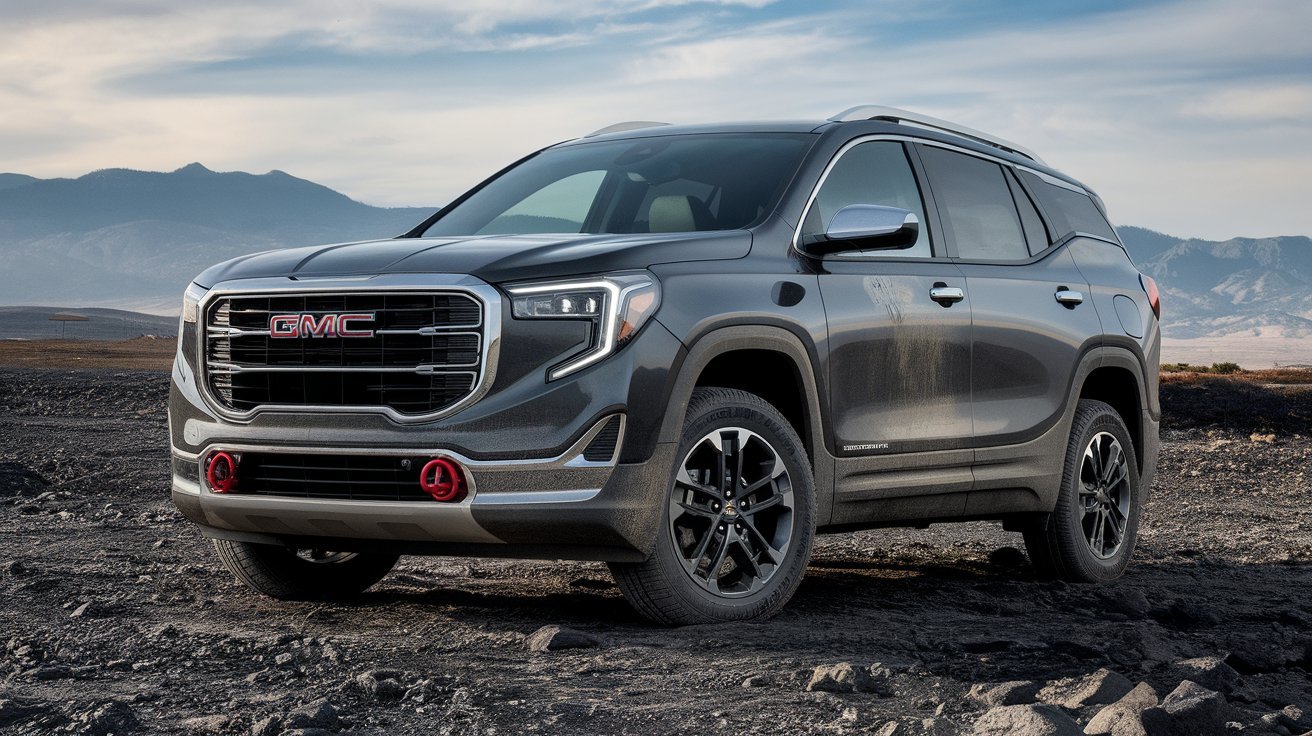
The 2026 GMC Terrain AT4 brings a rugged new personality to GMC’s compact SUV lineup. Designed for drivers who want everyday comfort combined with enhanced off-road capability, the AT4 trim stands out with exclusive styling, specialized suspension tuning, all-terrain equipment, and advanced technology features.
As GMC continues to expand its popular AT4 family, the Terrain AT4 delivers a more adventurous approach without sacrificing the practicality that compact SUV buyers expect. With upgraded ground clearance, off-road-focused engineering, premium interior features, and a modern infotainment system, the 2026 GMC Terrain AT4 is built for both daily commuting and weekend exploration. The redesigned Terrain also features a bold exterior and a range of technology upgrades that help it compete strongly in the compact SUV segment. citeturn0search0turn0search11
Bold Exterior Design with AT4 Exclusivity
The 2026 GMC Terrain AT4 immediately distinguishes itself from other Terrain trims through its aggressive styling and adventure-ready appearance.
Key exterior highlights include:
- AT4-exclusive grille design
- Red front recovery hooks
- Lifted ride height
- 17-inch wheels with all-terrain tires
- Front steel skid plate
- Black exterior accents
- Available two-tone roof
- Animated LED headlamps and taillamps
- Roof rails for added utility
GMC has given the Terrain a completely refreshed appearance with redesigned fascias, bumpers, and grille treatments. The rugged styling cues help reinforce the vehicle’s off-road identity while maintaining the premium appearance expected from the GMC brand. citeturn0search0turn0search10turn0search11
The AT4 trim’s unique visual elements create a confident road presence that appeals to outdoor enthusiasts and SUV buyers seeking something more distinctive than a traditional crossover.
Turbocharged Performance and AWD Capability
Under the hood, the 2026 GMC Terrain AT4 features a 1.5-liter turbocharged four-cylinder engine engineered to balance performance and efficiency.
Performance specifications include:
- 175 horsepower
- 203 lb-ft of torque (AWD models)
- 8-speed automatic transmission
- Standard all-wheel drive
- Smooth turbocharged acceleration
- Improved low-speed control
The turbocharged engine provides responsive power delivery suitable for both urban driving and highway travel. The standard all-wheel-drive system enhances traction on slippery roads and uneven terrain, giving drivers greater confidence in changing weather conditions. citeturn0search1turn0search11
The 8-speed automatic transmission contributes to smoother gear changes and improved fuel efficiency while helping maximize available engine performance. citeturn0search0turn0search10
Off-Road Features That Set the AT4 Apart
One of the biggest reasons buyers choose the 2026 GMC Terrain AT4 is its enhanced capability package.
Unlike standard crossover models, the AT4 trim includes equipment specifically designed to handle more challenging environments.
Notable off-road features include:
- AT4-exclusive Terrain Drive Mode
- Off-road-tuned suspension
- Hill Descent Control
- All-terrain tires
- Additional ground clearance
- Steel underbody protection
- Front skid plate
- Selectable drive modes
The AT4-exclusive Terrain Mode is particularly useful during low-speed off-road driving. It helps improve vehicle control while navigating rocks, steep inclines, uneven surfaces, and rough trails. GMC specifically engineered this mode to enhance crawling capability and driver confidence. citeturn0search0turn0search2
The combination of suspension upgrades, protective hardware, and advanced traction systems makes the Terrain AT4 the most adventure-focused Terrain model available. citeturn0search11turn0search0
Premium Interior Comfort and Practicality
While the exterior emphasizes rugged capability, the cabin of the 2026 GMC Terrain AT4 focuses on comfort and convenience.
Interior features include:
- Unique AT4 interior accents
- Heated steering wheel
- Heated front seats
- 8-way power driver seat
- 2-way lumbar support
- Wireless phone charging
- Premium seating materials
- Panoramic sunroof
- AutoSense power liftgate
The spacious cabin accommodates up to five passengers comfortably while offering generous cargo flexibility. The power liftgate makes loading luggage, groceries, and outdoor gear easier, especially when your hands are full. citeturn0search4turn0search10turn0search12
Premium materials and distinctive AT4 design details help create a cabin that feels both rugged and refined.
Advanced Technology and Connectivity Features
Technology plays a major role in the appeal of the 2026 GMC Terrain AT4. GMC has equipped the SUV with modern digital features that improve both convenience and connectivity.
Technology highlights include:
- 15-inch Premium GMC Infotainment System
- 11-inch Driver Information Center
- Google Built-In
- Wireless Apple CarPlay
- Wireless Android Auto
- Natural voice recognition
- Wi-Fi hotspot capability
- myGMC mobile app integration
The large 15-inch touchscreen serves as the centerpiece of the dashboard, providing access to navigation, entertainment, smartphone integration, and vehicle settings. Google Built-In allows drivers to access maps, voice commands, and connected applications directly through the infotainment system. citeturn0search3turn0search4turn0search12
These features help make daily driving more convenient while keeping drivers connected wherever their journeys take them.
Safety and Driver Assistance Technologies
Safety remains a top priority in the 2026 GMC Terrain AT4. GMC has equipped the SUV with a broad range of standard driver-assistance technologies designed to improve awareness and help reduce collision risks.
Available safety features include:
- Adaptive Cruise Control
- Lane Keep Assist
- Automatic Emergency Braking
- Intersection Emergency Braking
- Traffic Sign Recognition
- Rear Cross-Traffic Alerts
- Blind Zone Monitoring
- HD Rear Vision Camera
- Occupant Detection Systems
The Terrain lineup includes more than 15 standard safety and driver-assistance features, providing additional confidence during city driving, highway travel, and challenging weather conditions. citeturn0search4turn0search8turn0search12
Advanced safety technology helps make the Terrain AT4 a practical family SUV while preserving its adventurous personality.
Why the 2026 GMC Terrain AT4 Stands Out
The compact SUV market is highly competitive, yet the 2026 GMC Terrain AT4 offers a unique combination of rugged capability and premium comfort.
Major advantages include:
- Exclusive AT4 off-road equipment
- Standard all-wheel drive
- 175-horsepower turbocharged engine
- Lifted suspension and skid plate protection
- Large 15-inch infotainment display
- Google Built-In connectivity
- Premium interior appointments
- Strong safety technology package
For buyers who want more than a standard crossover, the Terrain AT4 delivers meaningful capability upgrades while maintaining everyday practicality. Its blend of adventure-ready engineering and premium technology helps it stand apart from many competitors in the compact SUV segment. citeturn0search0turn0search11
Conclusion
The 2026 GMC Terrain AT4 successfully combines off-road-inspired capability with modern comfort, advanced technology, and practical versatility. Featuring a 175-horsepower turbocharged engine, standard all-wheel drive, AT4-exclusive drive modes, premium interior amenities, and a sophisticated infotainment system, it offers an impressive package for drivers who enjoy both urban convenience and outdoor adventure.

Burghley House: History, Architecture, Gardens and Visitor Guide 2026

AISC Steel Construction Manual: Complete Guide for Structural Steel Design and Construction in 2026

2026 GMC Terrain AT4: Complete Guide to Features, Performance, Off-Road Capability, and Technology

Dorothée Lepère: Everything You Need to Know About François-Henri Pinault’s Former Wife

Ana Luz Rodriguez-Paz: Biography, Career, Achievements, and Complete Profile

5 Letter Words Starting with CA: Complete Word List, Meanings, Examples, and Word Game Guide (2026)
 celebrity3 months ago
Dorothée Lepère: Everything You Need to Know About François-Henri Pinault’s Former Wife
- celebrity3 months ago
Ana Luz Rodriguez-Paz: Biography, Career, Achievements, and Complete Profile
- Blog2 months ago
5 Letter Words Starting with CA: Complete Word List, Meanings, Examples, and Word Game Guide (2026)
- Food2 months ago
That-Bites.org: The Complete 2026 Guide to the Food, Lifestyle, and Recipe Platform
- celebrity3 months ago
Timothy shalloway: Biography, Movies, Career, Personal Life, and Hollywood Success
- Blog1 month ago
0800497: What Does This Number Mean and Is It a Scam in 2026?
- Health2 months ago
Hypackle: Everything You Need to Know About This Emerging Digital Platform
- Tech2 months ago
Ontpresscom About Us: Complete Guide to the Platform, Mission, Features, and Editorial Vision (2026)