
Blog
Honeywell Thermostat Install: Complete 2026 Installation and Wiring Guide


A Honeywell thermostat install can be a practical way to replace an older thermostat, improve temperature control, or add modern features such as programming, Wi-Fi connectivity, and smart-home integration. However, thermostat installation is not simply a matter of matching colored wires and attaching a new device to the wall. The correct procedure depends on the Honeywell Home thermostat model, the type of heating and cooling equipment in the home, and the existing wiring configuration.
Honeywell Home installation instructions emphasize an important point: thermostat wires should be identified by their terminal labels rather than wire color alone. Wire colors are not standardized, so assuming that a red, white, blue, or green wire always performs one particular function can result in an incorrect connection. Before starting a Honeywell thermostat install, homeowners should verify compatibility, shut off HVAC power, photograph the existing wiring, label the wires, and follow the instructions for the exact thermostat model.
What You Need Before a Honeywell Thermostat Install
Preparation makes the installation considerably easier. Before removing the existing thermostat, gather the new Honeywell Home thermostat, a Phillips screwdriver, a small flat-head screwdriver if required, a pencil, and a level. Depending on the wall and thermostat model, you may also need a drill, drill bit, wall anchors, wire labels, or small pliers. Honeywell’s current installation documentation lists several of these tools for its thermostat installations.
The first step is confirming that the thermostat is compatible with your HVAC system. Some models are designed for conventional heating and cooling systems, while others support heat pumps, multi-stage equipment, or particular wiring configurations.
Pay particular attention to the voltage. Standard Honeywell Home thermostats are generally intended for low-voltage HVAC systems. If you find thick wires, wire nuts, or wiring associated with 120/240-volt equipment, stop before continuing. Honeywell’s installation documentation warns that these systems require a different type of thermostat and should not be connected to a standard low-voltage model.
Turn Off Power and Document the Existing Wiring
Safety should come before wiring. Turn off the power to the heating and cooling equipment at the appropriate breaker or service switch. Some HVAC systems may have separate power supplies for different equipment.
After switching off the power, verify that the system does not start when you adjust the old thermostat. Honeywell recommends checking that the system is actually off before continuing.
Next, carefully remove the old thermostat’s faceplate without immediately disconnecting the wires. Take a clear photograph of the existing wiring, making sure the terminal letters are visible. This picture can become your most useful reference during installation.
The terminal label is more important than the wire’s color. Common terminals include R, Rc, Rh, W, Y, G, C, and O/B, but not every thermostat uses all of them. Honeywell specifically advises identifying wires by the terminals to which they are connected.
Label each connected wire before disconnecting it. Keep track of any jumper wires, because a jumper connecting two terminals is different from a separate wire leading into the HVAC system.
Understanding Honeywell Thermostat Wiring
Understanding the basic terminal designations makes a Honeywell thermostat install easier to follow. The exact configuration still depends on the HVAC system and thermostat model.
R generally provides 24-volt power from the heating transformer, while Rc is commonly associated with cooling power when separate heating and cooling circuits are used. W is commonly used for first-stage heating, Y for cooling or compressor control, and G for indoor fan control.
The C terminal, or common wire, provides a continuous power connection for many smart thermostats. Heat-pump systems can use an O/B terminal for the reversing valve. Other terminals may control second-stage heating, auxiliary heat, humidification, dehumidification, ventilation, or other equipment.
Honeywell’s official wiring guidance stresses that there is no universal wire-color standard. For that reason, do not connect wires solely because their colors appear to match a diagram. Follow the terminal labels and the installation instructions for your specific thermostat.
How to Mount the New Honeywell Thermostat
Once the old thermostat has been removed and the wires have been safely labeled, feed the wires through the opening in the new wall plate or mounting base. Position the base against the wall and use a level if necessary.
Mark the mounting holes, install suitable anchors when required, and secure the base with the supplied screws. Avoid overtightening because excessive force can damage or distort the mounting plate. Honeywell’s installation instructions recommend securing the mounting system firmly without overtightening the screws.
Thermostat location also matters. Honeywell recommends installing the thermostat approximately 5 feet (1.5 meters) above the floor in an area with representative room temperature and good air circulation. Avoid locations affected by drafts, direct sunlight, hot appliances, ducts, corners, doors, or unheated exterior areas.
Connecting the Wires to a Honeywell Thermostat
After the mounting plate is secure, connect the labeled wires to the corresponding terminals according to the thermostat’s installation guide.
A common conventional system may use R, W, Y, G, and C, but your system may have fewer or additional connections. A heat pump can have an O/B connection, while multi-stage equipment may require additional terminals.
If you have one R-type wire, the thermostat’s configuration may differ from a system with separate R and Rc wires. Certain Honeywell models use a slider or switch to configure the R connection. Do not assume that every Honeywell thermostat uses the same arrangement.
Smart thermostats may also require a C-wire or an approved power adapter. If your existing thermostat does not have a C-wire, check whether your particular Honeywell model supports a C-wire adapter or another approved installation method. Honeywell provides specific guidance for C-wire adapters and compatibility.
After inserting each wire, make sure it is firmly secured and that exposed conductors are not touching neighboring terminals.
Installing a Honeywell Smart Thermostat and C-Wire
A Honeywell smart thermostat install can involve additional configuration beyond simply connecting wires. Smart models may need continuous power, Wi-Fi setup, app configuration, and HVAC equipment selection.
The C-wire is especially important because many smart thermostats use it for continuous electrical power. If your existing system has a wire connected to C, it may be possible to connect it to the C terminal of the new thermostat, provided the thermostat’s instructions support that configuration.
If there is no C-wire, do not guess which unused wire can substitute for it. Honeywell offers C-wire adapter solutions for certain systems, but compatibility depends on the equipment and thermostat.
After installation, a smart thermostat may guide you through selecting heating and cooling equipment, configuring the fan, connecting to Wi-Fi, and pairing with its mobile application.
Restore Power and Test the System
Once all wiring has been checked, attach the thermostat display or faceplate to the mounted base according to the manufacturer’s instructions. Restore power to the HVAC system.
Allow the thermostat to start and then test the available modes. Depending on the system, check heating, cooling, and fan operation separately. Confirm that the thermostat responds when the temperature setting is adjusted.
If the system behaves unexpectedly, immediately stop troubleshooting by randomly moving wires. Turn off power and consult the installation manual or an HVAC professional.
A thermostat that displays an error, fails to power on, repeatedly resets, or activates the wrong equipment may indicate a wiring, compatibility, configuration, or HVAC-system problem rather than a defective thermostat.
Common Honeywell Thermostat Installation Mistakes
Several mistakes can make an otherwise straightforward installation unnecessarily difficult.
The first is matching wires by color instead of terminal labels. Because wire colors are not standardized, this can create incorrect connections.
Another mistake is failing to photograph the old thermostat before removing wires. A clear picture provides valuable information if the new thermostat uses a different terminal arrangement.
Installing a low-voltage thermostat on a line-voltage system is another serious error. Thick electrical wires, wire nuts, or 120/240-volt equipment should be treated as a warning sign.
Homeowners should also avoid guessing about heat-pump wiring. Heat pumps can use O/B terminals and auxiliary heat connections that differ from conventional furnace-and-air-conditioner systems. Honeywell’s instructions provide separate wiring guidance for heat-pump configurations.
Finally, forcing wires into the wrong terminals, leaving exposed conductors touching each other, or skipping the equipment compatibility check can cause improper HVAC operation.
Frequently Asked Questions About Honeywell Thermostat Install
Can I install a Honeywell thermostat myself?
A homeowner may be able to perform a straightforward low-voltage thermostat replacement when the HVAC system and thermostat are compatible and the wiring is clearly identified. However, complicated systems, unfamiliar wiring, heat pumps, line-voltage systems, or uncertain connections are situations where professional HVAC assistance is appropriate.
Do Honeywell thermostats need a C-wire?
Not every Honeywell thermostat requires the same wiring. Many smart thermostats need continuous power and may require a C-wire or an approved adapter. Check the installation instructions for the exact model.
Can I connect thermostat wires according to their colors?
No. Do not rely on color alone. Honeywell specifically states that there is no standard color scheme for thermostat wiring. Identify wires according to the terminal labels on the existing thermostat and the instructions for the new model.
Where should a thermostat be installed?
Honeywell recommends positioning the thermostat about 5 feet above the floor in an area with good air circulation and an average temperature. Avoid drafts, direct sunlight, ducts, appliances, and other sources of abnormal heating or cooling.
What if my Honeywell thermostat does not turn on?
First verify that HVAC power has been restored. Then check whether the wiring and C-wire configuration match the model’s instructions. If the thermostat remains blank or the wiring does not match the installation guide, stop and seek model-specific support rather than moving wires at random.
Conclusion
A successful Honeywell thermostat install starts with compatibility and safety rather than wiring. Turn off HVAC power, photograph the old thermostat, label every connected wire, identify terminals correctly, and follow the instructions for the exact Honeywell Home model.
The most important rule is to identify wires by terminal designation, not color. Smart thermostats also require special attention to the C-wire, power requirements, Wi-Fi configuration, and HVAC compatibility. When the system involves unfamiliar wiring, high voltage, complex heat-pump equipment, or connections that do not match the manual, professional installation is the safer approach.
With careful preparation and correct wiring, a Honeywell thermostat can provide reliable control over your home’s heating and cooling while making it easier to manage comfort and temperature settings.

Many Americans searching for “April’s Social Security payments won’t arrive as usual” are trying to understand why their benefit may appear on a different date than expected. Social Security payments do not arrive on one universal day each month. The Social Security Administration (SSA) uses different payment schedules depending on the type of benefit, when a person began receiving benefits, and the beneficiary’s date of birth.
For April 2026, the official SSA calendar shows several payment dates throughout the month. Supplemental Security Income (SSI) is scheduled for April 1. Some Social Security beneficiaries receive their payment on April 3, while most beneficiaries paid according to the Wednesday schedule receive payments on April 8, April 15, or April 22.
Understanding these rules is important because a payment arriving on a different day does not necessarily mean that benefits have been reduced, canceled, or delayed. In many cases, the date is simply determined by the standard SSA payment cycle.
Why April Social Security Payments Can Arrive on Different Dates
The SSA does not send every Social Security benefit on the same day. The payment date depends primarily on the type of benefit and the beneficiary’s circumstances.
People who started receiving Social Security before May 1, 1997, generally follow a different schedule from people who began receiving benefits later. The SSA explains that certain beneficiaries receive payments on the third day of the month, while beneficiaries covered by the newer schedule generally receive payments on a Wednesday based on their birth date.
For beneficiaries whose payment date is determined by their birthday, the schedule works as follows:
- Birthdays from the 1st through the 10th generally receive payment on the second Wednesday.
- Birthdays from the 11th through the 20th generally receive payment on the third Wednesday.
- Birthdays from the 21st through the 31st generally receive payment on the fourth Wednesday.
This means two people living in the same household could potentially receive Social Security on different days.
April 2026 Social Security Payment Dates
The official 2026 Social Security payment calendar provides the dates beneficiaries can use to plan their April income.
For April 2026, the important dates include:
| Benefit or payment group | April 2026 payment date |
|---|---|
| SSI | April 1 |
| Certain Social Security beneficiaries paid on the 3rd | April 3 |
| Birth dates 1st–10th | April 8 |
| Birth dates 11th–20th | April 15 |
| Birth dates 21st–31st | April 22 |
The exact situation can be more complicated for people who receive both SSI and Social Security, because those benefits can follow different payment rules. The SSA recommends using its official benefit-payment schedule to determine an individual’s upcoming payment dates.
Therefore, someone expecting a payment near the beginning of April should not automatically assume that everyone else receiving Social Security will receive money on the same day.
Why Some Beneficiaries Receive Social Security on April 3
The April 3 payment date can be particularly important for beneficiaries who are covered by the older payment schedule or certain special circumstances.
According to the SSA, beneficiaries who were receiving or had applied for Social Security benefits by April 30, 1997, generally receive benefits on the third day of the month. The SSA also lists several circumstances in which beneficiaries continue to receive payment on the third, including certain people who receive both Social Security and SSI.
April 3, 2026, falls on a Friday, so the normal weekday payment rule does not require the payment to be moved earlier.
This is an important distinction because Social Security dates can sometimes move when a scheduled payment falls on a Saturday, Sunday, or legal public holiday. SSA policy says that when a scheduled payment falls on one of those days, benefits are generally paid on the preceding business day.
How SSI Payments Differ From Social Security
Another reason April’s payment schedule can seem unusual is the difference between SSI and Social Security retirement or disability benefits.
SSI is a needs-based federal program with its own payment schedule. SSI payments are generally scheduled for the first day of the month. If that date falls on a weekend or qualifying holiday, the payment can be issued on the preceding business day.
For April 2026, April 1 is a Wednesday, so the official calendar places the April SSI payment on that date.
People who receive both SSI and Social Security should therefore pay attention to both schedules. Seeing one deposit arrive at the beginning of the month does not necessarily mean that another Social Security payment is missing.
What to Do If Your April Payment Has Not Arrived
If your expected payment date has passed and the money has not appeared, first verify the official payment date for your specific benefit. The SSA provides an online tool where beneficiaries can view upcoming and past payment dates.
Next, check the financial institution or payment method associated with your benefits. Banks and other financial institutions can have their own processing times, so the date a payment becomes visible in an account can sometimes differ from the date established by SSA.
If the payment still has not arrived after checking these possibilities, contact the Social Security Administration. SSA’s published payment information provides its automated phone assistance number, 1-800-772-1213, and TTY assistance at 1-800-325-0778.
Avoid relying on social-media posts or unofficial payment calendars when a benefit appears late. The official SSA schedule should be the primary reference.
Does a Different April Payment Date Mean Benefits Are Changing?
A different payment date does not automatically mean that the amount of a person’s benefits has changed. Payment timing and benefit amounts are separate issues.
The SSA’s schedule is designed to distribute payments according to established rules. For most beneficiaries on the Wednesday schedule, the payment date is tied to the day of birth of the person whose earnings record determines the benefit.
Consequently, a beneficiary who normally receives money around the middle of a month should not expect the payment to arrive on exactly the same numerical day every month.
The best way to avoid confusion is to check the annual SSA payment calendar and identify the applicable payment category before assuming that a payment is late.
Frequently Asked Questions About April’s Social Security Payments
Will Social Security payments be delayed in April 2026?
Not generally. April 2026 has multiple scheduled payment dates, and receiving a payment later in the month can be normal depending on the beneficiary’s payment category and birth date.
When is SSI paid in April 2026?
The official SSA calendar lists April 1, 2026, as the April SSI payment date.
When will Social Security be paid in April 2026?
Depending on the beneficiary’s circumstances, scheduled April dates include April 3, April 8, April 15, and April 22.
Why do Social Security recipients have different payment dates?
The SSA uses different schedules based on factors including when benefits began, the type of benefit, and the beneficiary’s date of birth.
What happens if a Social Security payment date falls on a weekend?
If a scheduled payment date falls on a Saturday, Sunday, or legal public holiday, SSA generally issues the payment on the preceding business day.
Where can I check my personal payment date?
The SSA provides an online benefit payment schedule where beneficiaries can check upcoming and previous payment dates.
Conclusion
The headline “April’s Social Security payments won’t arrive as usual” can sound alarming, but the April 2026 schedule is largely explained by the SSA’s established payment system. Social Security benefits are distributed on different dates rather than arriving on one universal day.
For April 2026, SSI is scheduled for April 1, while certain Social Security beneficiaries are scheduled for April 3. Beneficiaries on the Wednesday birthday-based schedule are scheduled for April 8, April 15, or April 22, depending on their date of birth.
The key is to identify which payment schedule applies to you. If your payment does not arrive on its official scheduled date, check your SSA payment information and financial institution before assuming there is a broader problem. The official Social Security Administration calendar remains the most reliable source for determining when April benefits are scheduled.

Burghley House is one of England’s most remarkable surviving 16th-century country houses, standing near Stamford in Lincolnshire. Created for William Cecil, one of the most powerful statesmen of Elizabeth I’s reign, the house combines spectacular Elizabethan architecture with extraordinary interiors, fine art, historic gardens and a large surrounding parkland.
More than 500 years after construction began, Burghley remains a living family home as well as a major heritage attraction. Visitors can explore its magnificent State Rooms, gardens, parkland, exhibitions, shops, restaurants and family attractions.
What Is Burghley House?
Burghley House is a grand Elizabethan house located close to Stamford, Lincolnshire. It was commissioned by William Cecil, 1st Baron Burghley, who served as Lord High Treasurer to Queen Elizabeth I.
The building was conceived not simply as a residence but also as a powerful demonstration of Cecil’s status, wealth and influence. Construction began in 1554, with the east and south ranges substantially completed by 1564. The west front, including its great gate-house, was completed in 1577, while the north front followed in 1587.
Today, Burghley is still connected to the Cecil family. The official history explains that the property remains a family home occupied by a direct descendant of William Cecil, while a dedicated team works to preserve the house, collections and estate for visitors and future generations.
The History and Architecture of Burghley House
One of the most fascinating aspects of Burghley is the way its architecture reflects different periods of English history.
Its original design represents the ambition of the Elizabethan age, with impressive stonework, elaborate façades and a carefully planned arrangement of courtyards and rooms. The house was constructed using hard, shelly limestone quarried from nearby Kingscliffe, land owned by Cecil.
Later generations made substantial changes. In the late 17th century, the 5th Earl of Exeter introduced arched windows to the south front, partly associated with alterations and possible repairs following Civil War damage.
The 18th century brought another major transformation. In 1754, Brownlow, 9th Earl of Exeter, employed Lancelot “Capability” Brown, the famous landscape designer, as both a landscape designer and architect. Brown worked on the parkland, designed the Orangery and created a Gothic garden summerhouse, helping establish the landscape character that visitors can still appreciate today.
Inside Burghley House: State Rooms and Art
The interior of Burghley House is just as important as its exterior. Visitors can explore a collection of magnificent State Rooms, filled with paintings, decorative arts, furniture and historic treasures.
The visitor experience includes 18 magnificent State Rooms, as well as features such as the original soaring Tudor kitchen. One particularly memorable route takes visitors down the Hell Staircase, decorated with paintings by Antonio Verrio, before reaching the Great Hall, which was used as a banqueting hall during the Elizabethan period.
The interiors also demonstrate how the house evolved through successive generations. While the exterior remains largely representative of William Cecil’s original creation, descendants transformed many interior spaces and built an extraordinary collection of artworks and objects.
For anyone interested in Elizabethan history, British architecture, historic houses or fine art, the interiors provide an opportunity to see how an aristocratic country house developed over several centuries.
Burghley Gardens and the Capability Brown Landscape
The gardens are another major reason people visit Burghley. The estate contains several distinctive garden areas, each offering a different experience.
The Sculpture Garden combines contemporary artworks with naturalistic planting, wildflowers and sweeping views toward Capability Brown’s Great Lake. Visitors can follow winding paths while viewing sculptures in an expansive landscape setting.
The Garden of Surprises provides a very different atmosphere. Inspired by Elizabethan ideas about astrology, astronomy and classical civilisation, it contains fountains, water features, a moss house, a mirrored maze and other unexpected features.
Burghley’s gardens continue to develop while retaining their historic character. In 2026, the gardens were shortlisted for the Historic Houses Garden of the Year Award, highlighting their combination of heritage, horticulture and visitor experience.
Burghley Parkland and Family Attractions
Beyond the house and formal gardens, Burghley Parkland provides a large outdoor landscape where visitors can enjoy open space, ancient trees, wildlife and views associated with Capability Brown’s work.
The estate also offers Hide & Secrets Adventure Play, a family attraction inspired by William Cecil and his reputation as an early political information-gatherer. The attraction includes climbing areas, slides, tunnels, walkways, code-cracking games and the distinctive Hidden Towers.
This combination makes Burghley more than a traditional historic-house visit. Families can combine history, gardens, outdoor exploration and children’s activities during the same trip.
The estate also hosts special events throughout the year. The 2026 calendar includes activities ranging from historic living-history experiences to seasonal garden events and family tours.
Visiting Burghley House in 2026
For visitors planning a Burghley House 2026 trip, checking the official opening information before travelling is important because different areas have different schedules.
During the main 2026 season, the House is open Saturday through Thursday from 10:30 a.m. to 4:30 p.m., while the Gardens and Adventure Play generally operate from 10 a.m. to 5 p.m. The Parkland has longer daily access, generally from 7 a.m. until dusk.
The main House, Gardens and Adventure Play season runs through 1 November 2026, with additional selected weekend openings for the Gardens and Adventure Play later in November. The official visitor information also notes that opening dates can change because of events, conservation work and other planned closures.
Burghley is also accessible from Stamford railway station, which is approximately half a mile from the entrance to the Parkland and around 1.5 miles from Burghley House itself. Local bus services also provide access to the main visitor entrance.
Why Burghley House Remains Important
The lasting appeal of Burghley House comes from the combination of architecture, family history, art, gardens and landscape. Few historic attractions provide such a complete picture of how a major English country estate developed over more than five centuries.
Its connection with William Cecil and Elizabeth I, its spectacular Elizabethan architecture, its later association with Capability Brown, and its continuing role as a family home all contribute to its importance.
At the same time, Burghley continues to evolve. Modern visitors can experience historic rooms and works of art alongside contemporary sculpture, family attractions, seasonal events and carefully maintained gardens.
For anyone searching for historic houses near Stamford, Elizabethan houses in England, or things to do around Lincolnshire, Burghley House offers a distinctive combination of heritage and modern visitor experiences.
Final Thoughts on Burghley House
Burghley House is far more than an impressive historic building. It represents over 500 years of English history, beginning with William Cecil’s Elizabethan vision and continuing through generations of the Cecil family.
Its grand State Rooms, extraordinary art collection, Tudor features, Capability Brown landscape, Sculpture Garden, Garden of Surprises and extensive parkland give visitors many different reasons to explore the estate.
In 2026, Burghley remains a living historic estate where conservation and public access work together. Whether the interest is architecture, history, gardens, art, family activities or countryside, Burghley House provides an opportunity to experience an important part of England’s heritage in one remarkable setting.
Blog
2026 GMC Terrain AT4: Complete Guide to Features, Performance, Off-Road Capability, and Technology
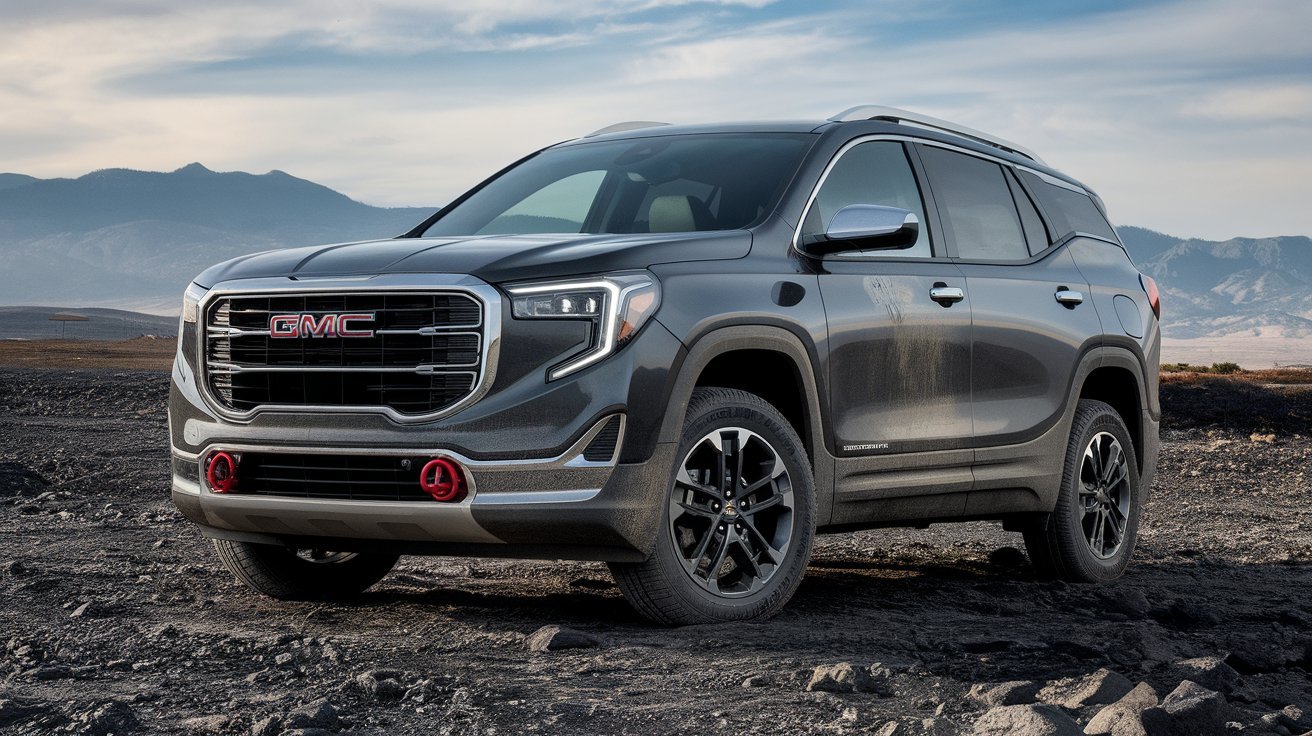
The 2026 GMC Terrain AT4 brings a rugged new personality to GMC’s compact SUV lineup. Designed for drivers who want everyday comfort combined with enhanced off-road capability, the AT4 trim stands out with exclusive styling, specialized suspension tuning, all-terrain equipment, and advanced technology features.
As GMC continues to expand its popular AT4 family, the Terrain AT4 delivers a more adventurous approach without sacrificing the practicality that compact SUV buyers expect. With upgraded ground clearance, off-road-focused engineering, premium interior features, and a modern infotainment system, the 2026 GMC Terrain AT4 is built for both daily commuting and weekend exploration. The redesigned Terrain also features a bold exterior and a range of technology upgrades that help it compete strongly in the compact SUV segment. citeturn0search0turn0search11
Bold Exterior Design with AT4 Exclusivity
The 2026 GMC Terrain AT4 immediately distinguishes itself from other Terrain trims through its aggressive styling and adventure-ready appearance.
Key exterior highlights include:
- AT4-exclusive grille design
- Red front recovery hooks
- Lifted ride height
- 17-inch wheels with all-terrain tires
- Front steel skid plate
- Black exterior accents
- Available two-tone roof
- Animated LED headlamps and taillamps
- Roof rails for added utility
GMC has given the Terrain a completely refreshed appearance with redesigned fascias, bumpers, and grille treatments. The rugged styling cues help reinforce the vehicle’s off-road identity while maintaining the premium appearance expected from the GMC brand. citeturn0search0turn0search10turn0search11
The AT4 trim’s unique visual elements create a confident road presence that appeals to outdoor enthusiasts and SUV buyers seeking something more distinctive than a traditional crossover.
Turbocharged Performance and AWD Capability
Under the hood, the 2026 GMC Terrain AT4 features a 1.5-liter turbocharged four-cylinder engine engineered to balance performance and efficiency.
Performance specifications include:
- 175 horsepower
- 203 lb-ft of torque (AWD models)
- 8-speed automatic transmission
- Standard all-wheel drive
- Smooth turbocharged acceleration
- Improved low-speed control
The turbocharged engine provides responsive power delivery suitable for both urban driving and highway travel. The standard all-wheel-drive system enhances traction on slippery roads and uneven terrain, giving drivers greater confidence in changing weather conditions. citeturn0search1turn0search11
The 8-speed automatic transmission contributes to smoother gear changes and improved fuel efficiency while helping maximize available engine performance. citeturn0search0turn0search10
Off-Road Features That Set the AT4 Apart
One of the biggest reasons buyers choose the 2026 GMC Terrain AT4 is its enhanced capability package.
Unlike standard crossover models, the AT4 trim includes equipment specifically designed to handle more challenging environments.
Notable off-road features include:
- AT4-exclusive Terrain Drive Mode
- Off-road-tuned suspension
- Hill Descent Control
- All-terrain tires
- Additional ground clearance
- Steel underbody protection
- Front skid plate
- Selectable drive modes
The AT4-exclusive Terrain Mode is particularly useful during low-speed off-road driving. It helps improve vehicle control while navigating rocks, steep inclines, uneven surfaces, and rough trails. GMC specifically engineered this mode to enhance crawling capability and driver confidence. citeturn0search0turn0search2
The combination of suspension upgrades, protective hardware, and advanced traction systems makes the Terrain AT4 the most adventure-focused Terrain model available. citeturn0search11turn0search0
Premium Interior Comfort and Practicality
While the exterior emphasizes rugged capability, the cabin of the 2026 GMC Terrain AT4 focuses on comfort and convenience.
Interior features include:
- Unique AT4 interior accents
- Heated steering wheel
- Heated front seats
- 8-way power driver seat
- 2-way lumbar support
- Wireless phone charging
- Premium seating materials
- Panoramic sunroof
- AutoSense power liftgate
The spacious cabin accommodates up to five passengers comfortably while offering generous cargo flexibility. The power liftgate makes loading luggage, groceries, and outdoor gear easier, especially when your hands are full. citeturn0search4turn0search10turn0search12
Premium materials and distinctive AT4 design details help create a cabin that feels both rugged and refined.
Advanced Technology and Connectivity Features
Technology plays a major role in the appeal of the 2026 GMC Terrain AT4. GMC has equipped the SUV with modern digital features that improve both convenience and connectivity.
Technology highlights include:
- 15-inch Premium GMC Infotainment System
- 11-inch Driver Information Center
- Google Built-In
- Wireless Apple CarPlay
- Wireless Android Auto
- Natural voice recognition
- Wi-Fi hotspot capability
- myGMC mobile app integration
The large 15-inch touchscreen serves as the centerpiece of the dashboard, providing access to navigation, entertainment, smartphone integration, and vehicle settings. Google Built-In allows drivers to access maps, voice commands, and connected applications directly through the infotainment system. citeturn0search3turn0search4turn0search12
These features help make daily driving more convenient while keeping drivers connected wherever their journeys take them.
Safety and Driver Assistance Technologies
Safety remains a top priority in the 2026 GMC Terrain AT4. GMC has equipped the SUV with a broad range of standard driver-assistance technologies designed to improve awareness and help reduce collision risks.
Available safety features include:
- Adaptive Cruise Control
- Lane Keep Assist
- Automatic Emergency Braking
- Intersection Emergency Braking
- Traffic Sign Recognition
- Rear Cross-Traffic Alerts
- Blind Zone Monitoring
- HD Rear Vision Camera
- Occupant Detection Systems
The Terrain lineup includes more than 15 standard safety and driver-assistance features, providing additional confidence during city driving, highway travel, and challenging weather conditions. citeturn0search4turn0search8turn0search12
Advanced safety technology helps make the Terrain AT4 a practical family SUV while preserving its adventurous personality.
Why the 2026 GMC Terrain AT4 Stands Out
The compact SUV market is highly competitive, yet the 2026 GMC Terrain AT4 offers a unique combination of rugged capability and premium comfort.
Major advantages include:
- Exclusive AT4 off-road equipment
- Standard all-wheel drive
- 175-horsepower turbocharged engine
- Lifted suspension and skid plate protection
- Large 15-inch infotainment display
- Google Built-In connectivity
- Premium interior appointments
- Strong safety technology package
For buyers who want more than a standard crossover, the Terrain AT4 delivers meaningful capability upgrades while maintaining everyday practicality. Its blend of adventure-ready engineering and premium technology helps it stand apart from many competitors in the compact SUV segment. citeturn0search0turn0search11
Conclusion
The 2026 GMC Terrain AT4 successfully combines off-road-inspired capability with modern comfort, advanced technology, and practical versatility. Featuring a 175-horsepower turbocharged engine, standard all-wheel drive, AT4-exclusive drive modes, premium interior amenities, and a sophisticated infotainment system, it offers an impressive package for drivers who enjoy both urban convenience and outdoor adventure.

April’s Social Security Payments Won’t Arrive as Usual: 2026 Payment Schedule Explained

Honeywell Thermostat Install: Complete 2026 Installation and Wiring Guide

Burghley House: History, Architecture, Gardens and Visitor Guide 2026

Dorothée Lepère: Everything You Need to Know About François-Henri Pinault’s Former Wife

Ana Luz Rodriguez-Paz: Biography, Career, Achievements, and Complete Profile

5 Letter Words Starting with CA: Complete Word List, Meanings, Examples, and Word Game Guide (2026)
 celebrity3 months ago
Dorothée Lepère: Everything You Need to Know About François-Henri Pinault’s Former Wife
- celebrity3 months ago
Ana Luz Rodriguez-Paz: Biography, Career, Achievements, and Complete Profile
- Blog2 months ago
5 Letter Words Starting with CA: Complete Word List, Meanings, Examples, and Word Game Guide (2026)
- Food2 months ago
That-Bites.org: The Complete 2026 Guide to the Food, Lifestyle, and Recipe Platform
- celebrity3 months ago
Timothy shalloway: Biography, Movies, Career, Personal Life, and Hollywood Success
- Blog1 month ago
0800497: What Does This Number Mean and Is It a Scam in 2026?
- Health2 months ago
Hypackle: Everything You Need to Know About This Emerging Digital Platform
- Tech2 months ago
Ontpresscom About Us: Complete Guide to the Platform, Mission, Features, and Editorial Vision (2026)